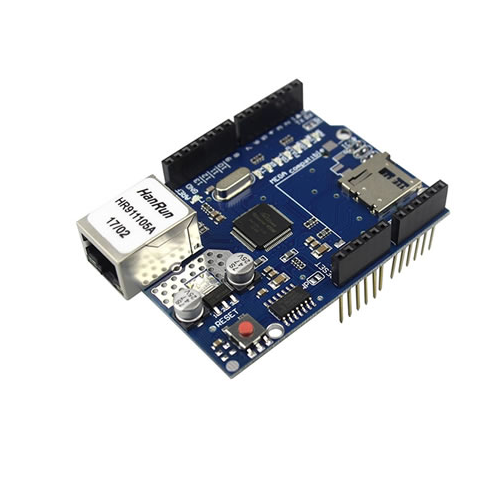
The Ethernet Shield W5100 is a network interface board designed for use with microcontrollers to provide Ethernet connectivity. It features the W5100 Ethernet chip from WIZnet, which provides a robust and reliable network connection for various embedded applications. This shield allows microcontrollers to communicate over the internet or local networks, making it ideal for IoT projects, web servers, and networked devices.Key Features:Provides Ethernet connectivity for microcontrollersUses the W5100 Ethernet chip for reliable network communicationSupports TCP, UDP, HTTP, and other network protocolsEasy to interface with microcontrollers through SPICompatible with popular microcontroller platforms (e.g., Arduino)Onboard RJ45 connector for network connectionIntegrated status LEDs for network activity and link statusTechnical Specifications:Ethernet Chip: W5100 (WIZnet)Interface: SPI (Serial Peripheral Interface)Network Protocols: TCP, UDP, IP, ICMP, HTTP, and moreConnector Type: RJ45 Ethernet connectorOperating Voltage: Typically 5V (from microcontroller power supply)Power Consumption: Varies depending on network activityDimensions: Typically 68.6mm x 53.4mm (varies by manufacturer)Operating Temperature Range: -40°C to 85°C (depending on model)Applications:IoT (Internet of Things) projectsWeb servers and client applicationsNetworked sensors and data loggersRemote control and monitoring systemsNetworked automation and control systemsUsage:Attach the Ethernet Shield W5100 to the microcontroller or development board, ensuring proper alignment with the board’s pin headers.Connect an Ethernet cable to the RJ45 connector on the shield.Power the microcontroller and Ethernet shield using the appropriate voltage (typically 5V).Use the relevant library or driver for your microcontroller to initialize and configure the Ethernet shield for network communication.Implement network communication protocols and functions in your application code to interact with other devices or servers over the network.Caution:Ensure proper power supply and connections to avoid damage to the shield and microcontroller.Verify Ethernet cable and network connections for proper network functionality.Follow manufacturer guidelines for library and driver usage to ensure compatibility and correct operation